
Total 60 Questions
Last Updated On : 5-May-2026
Preparing with Salesforce-MuleSoft-Developer-II practice test 2026 is essential to ensure success on the exam. It allows you to familiarize yourself with the Salesforce-MuleSoft-Developer-II exam questions format and identify your strengths and weaknesses. By practicing thoroughly, you can maximize your chances of passing the Salesforce certification 2026 exam on your first attempt. Start with free Salesforce Certified MuleSoft Developer II - Mule-Dev-301 sample questions or use the timed simulator for full exam practice. Surveys from different platforms and user-reported pass rates suggest Salesforce Certified MuleSoft Developer II - Mule-Dev-301 practice exam users are ~30-40% more likely to pass.

A Mule implementation uses a HTTP Request within an Unit Successful scope to connect to an API. How should a permanent error response like HTTP:UNAUTHORIZED be handle inside Until Successful to reduce latency?
A. Configure retrying until a MULERETRY_EXHAUSTED error is raised or the API responds back with a successful response.
B. In Until Successful configuration, set the retry count to 1 for error type HTTP: UNAUTHORIZED.
C. Put the HTTP Request inside a try scope in Unit Successful.
In the error handler, use On Error Continue to catch permanent errors like HTTP
UNAUTHORIZED.
D. Put the HTTP Request inside a try scope in Unit Successful.
In the error handler, use On Error Propagate to catch permanent errors like HTTP
UNAUTHORIZED.
Explanation:
To reduce latency when handling a permanent error response like HTTP:UNAUTHORIZED in a Mule implementation using an Until Successful scope, the best approach is:
✅ C. Put the HTTP Request inside a try scope in Until Successful. In the error handler, use On Error Continue to catch permanent errors like HTTP:UNAUTHORIZED.
Why HTTP:UNAUTHORIZED should not be retried: HTTP:UNAUTHORIZED (401) is a permanent error, indicating that the request lacks valid authentication credentials. Retrying the same request without modifying the credentials will not resolve the issue and will only increase latency due to unnecessary retries.
Why use a Try Scope with On Error Continue: Placing the HTTP Request inside a Try scope within the Until Successful scope allows you to handle errors explicitly. Using On Error Continue for HTTP:UNAUTHORIZED ensures that the flow continues without retrying the request, as this error is not transient. This approach minimizes latency by avoiding futile retry attempts and allows the flow to proceed with alternative logic (e.g., logging, fallback, or response handling).
❌ Why not the other options:
A. Configure retrying until a MULE:RETRY_EXHAUSTED error is raised or the API responds back with a successful response: This approach would cause the Until Successful scope to keep retrying the request, even for a permanent error like HTTP:UNAUTHORIZED. This increases latency unnecessarily, as the error will not resolve without changing the credentials.
B. In Until Successful configuration, set the retry count to 1 for error type HTTP:UNAUTHORIZED: While setting a low retry count reduces the number of attempts, it still introduces unnecessary retries for a permanent error. It’s better to avoid retries altogether for HTTP:UNAUTHORIZED.
D. Put the HTTP Request inside a try scope in Until Successful. In the error handler, use On Error Propagate to catch permanent errors like HTTP:UNAUTHORIZED: Using On Error Propagate will propagate the error up the flow, potentially stopping the Until Successful scope or the entire flow. This does not allow the flow to continue gracefully, which is often undesirable for handling permanent errors like HTTP:UNAUTHORIZED.
How it works in Mule:
➤ The Until Successful scope retries the enclosed logic for transient errors until a success condition is met or the retry limit is exhausted.
➤ By wrapping the HTTP Request in a Try scope and configuring an On Error Continue handler for HTTP:UNAUTHORIZED, you can catch the error, handle it (e.g., log it or return a custom response), and allow the flow to proceed without retrying the failed request.
➤ This approach ensures minimal latency by avoiding unnecessary retries for permanent errors while still allowing the Until Successful scope to handle transient errors appropriately.
Reference:
MuleSoft Documentation: Error Handling and Until Successful Scope
An API has been built to enable scheduling email provider. The front-end system does very
little data entry validation, and problems have started to appear in the email that go to
patients. A validate-customer’’ flow is added validate thedata.
What is he expected behavior of the ‘validate-customer’’ flow?
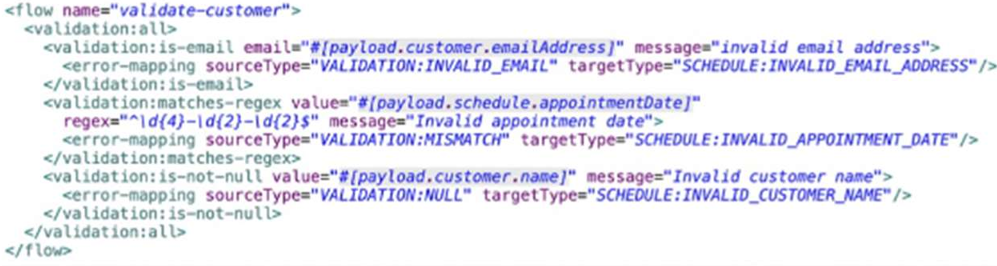
A. If only the email address Is invalid a VALIDATION.INVALID_EMAIL error is raised
B. If the email address is invalid, processing continues to see if the appointment data and customer name are also invalid
C. If the appointment date and customer name are invalid, a SCHEDULE:INVALID_APPOINTMENT_DATE error is raised
D. If all of the values are invalid the last validation error is raised:SCHEDULE:INVALID_CUSTOMER_NAME
Explanation:
This question is testing your understanding of error handling and validation flow within Mule applications, specifically how validation components typically behave and how errors are propagated.
Let's break down the options:
A. If only the email address Is invalid a VALIDATION.INVALID_EMAIL error is raised
Plausible. In a typical validation flow, if a specific validation rule fails (e.g., email format), an error related to that failure is raised immediately. This is standard behavior for "fail-fast" validation.
B. If the email address is invalid, processing continues to see if the appointment data and customer name are also invalid
Less plausible for a single validate-customer flow designed for "fail-fast". While you can design validation to collect all errors before throwing, a single validate-customer flow implies a sequence. If the email is fundamentally invalid, continuing to validate other fields for the same customer might be redundant if the overall record is already considered invalid. However, if the validate-customer flow contains multiple, independent validation components that are designed to execute regardless of prior failures (e.g., using a scatter-gather for parallel validation, or a custom approach), this could happen, but it's not the most common "expected behavior" for a named validation flow unless explicitly stated.
C. If the appointment date and customer name are invalid, a
SCHEDULE:INVALID_APPOINTMENT_DATE error is raised
Highly Unlikely. If multiple validation errors occur within a sequential flow, typically only the first error encountered will be propagated and stop the flow, unless there's specific logic to aggregate errors. If both the appointment date and customer name are invalid, and the validation for appointment date precedes customer name, then SCHEDULE:INVALID_APPOINTMENT_DATE would be raised. However, if the customer name validation precedes the appointment date, then SCHEDULE:INVALID_CUSTOMER_NAME would be raised. This option implies a specific priority, but not the general behavior when multiple validations fail sequentially.
D. If all of the values are invalid the last validation error is raised:
SCHEDULE:INVALID_CUSTOMER_NAME
Plausible if validations are sequential and CUSTOMER_NAME is the last one checked. This aligns with the "fail-fast" principle where the first encountered error stops the flow and is raised. If CUSTOMER_NAME validation is the last one in sequence and all previous ones passed (or were not reached because of an earlier failure), and then CUSTOMER_NAME fails, this would be the error raised. However, the question implies multiple validations within the validate-customer flow. If the first validation (e.g., email) fails, then subsequent validations for appointment date and customer name might not even be executed.
Re-evaluating based on "Expected Behavior"
In a typical MuleSoft validation scenario, especially with out-of-the-box validation components:
Fail-Fast is the
default: When a validation component encounters an invalid input, it typically stops further processing in that path and raises an error immediately.
Error Type Specificity: The error raised will usually be specific to the validation that failed.
Given this, let's reconsider:
If the validate-customer flow is designed to validate sequentially (email, then appointment date, then customer name):
If the email is invalid, it would raise an INVALID_EMAIL error and stop.
If the email is valid but the appointment date is invalid, it would raise an INVALID_APPOINTMENT_DATE error and stop.
If both email and appointment date are valid but the customer name is invalid, it would raise an INVALID_CUSTOMER_NAME error and stop.
Now, let's look at the options again with this understanding:
A. If only the email address Is invalid a VALIDATION.INVALID_EMAIL error is raised
This is the most accurate description of typical "fail-fast" validation behavior. If the email is the first validation to fail, it will be the error that's raised, and subsequent validations won't be performed.
B. If the email address is invalid, processing continues to see if the appointment data and customer name are also invalid
This would only happen if the validation flow is explicitly designed for all-at-once validation (e.g., using a custom aggregator or All scope with specific error handling to collect all errors). This is not the default or "expected" behavior of a simple validation flow.
C. If the appointment date and customer name are invalid, a SCHEDULE:INVALID_APPOINTMENT_DATE error is raised
This is too specific and assumes the order of validation and that the SCHEDULE:INVALID_APPOINTMENT_DATE is always the first one to fail among those two. It doesn't account for the email validation potentially failing first.
D. If all of the values are invalid the last validation error is raised: SCHEDULE:INVALID_CUSTOMER_NAME
This is only true if the customer name validation is the last one in the sequence and all preceding validations passed. If "all values are invalid," the first invalid value encountered in the sequence would typically cause the error to be raised, not necessarily the last one.
Conclusion:
The most standard and "expected" behavior of a validation flow in MuleSoft, especially when not specified otherwise (like collecting all errors), is to fail fast. This means the moment an invalid condition is met, an error specific to that condition is raised, and the flow stops.
Therefore, if the email address is the first thing validated and it's invalid, that's the error that will be raised.
The final answer is
A
A company with MuleSoft Titanium develops a Salesforce System API using MuleSoft outof- the-box Salesforce Connector and deploys the API to CloudHub. Which steps provide the average number of requests and average response time of the Salesforce Connector?
A. Access Anypoint Monitoring’s built-in dashboard. Select a resource.
Locate the information under the Connectors tab.
B. Access Anypoint Monitoring’s built-in dashboard
Select a resource.
Create a custom dashboard to retrieve the information.
C. Access Anypoint Monitoring built-in dashboard.
Select a resource.
Locate the information under Log Manager < Raw Data.
D. Change the API Implementation to capture the information in the log.
Retrieve the information from the log file.
Explanation:
MuleSoft Titanium subscription includes Anypoint Monitoring (Advanced), which provides rich observability features, including:
➟ Built-in dashboards
➟ Per-connector metrics
➟ Response times
➟ Number of requests
➟ Error rates
When using Anypoint Monitoring’s built-in dashboard for a deployed app (e.g., your Salesforce System API on CloudHub), you can:
1. Select the deployed application from the monitoring dashboard.
2. Navigate to the "Connectors" tab.
3. View per-connector metrics like:
➟ Average number of requests
➟ Average response time
➟ Failures per minute
This provides the required information without writing custom code or logs.
❌ Why other options are incorrect:
B. Create a custom dashboard
🔸 Incorrect: Custom dashboards are optional and used for specific KPIs or cross-app metrics. Built-in dashboards already provide connector-level insights.
C. Locate information under Log Manager → Raw Data
🔸 Incorrect: Raw logs provide event-level data, not aggregate metrics like average response time or request counts.
D. Change the API implementation to log the information
🔸 Incorrect: Manually logging metrics is error-prone and unnecessary when using Titanium’s built-in monitoring.
🔗 Reference:
MuleSoft Docs – Anypoint Monitoring (Titanium)
Monitoring Connectors in CloudHub
A Mule application contain two policies Policy A and Policy A has order1, and Policy B has
order 2. Policy A Policy B, and a flow are defined by he configuration below.
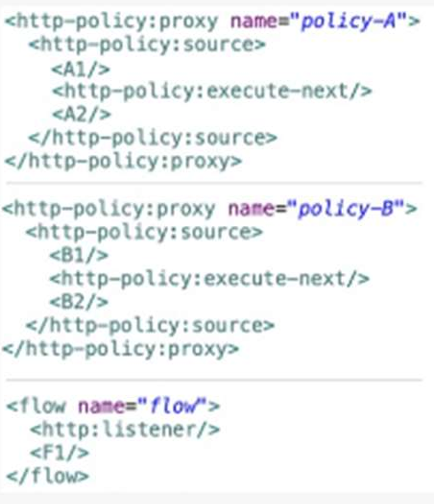
When a HTTP request arrives at the Mule application’s endpoint, what will be the execution
order?
A. A1, B1, F1, B2, A2
B. B1, A1, F1, A2, B2
C. F1, A1, B1, B2, A2
D. F1, B1, A1, A2, B2
Explanation:
Understanding Policy Execution Order in Mule 4
Policies are applied in ascending order (lower order value executes first).
Policy A (order=1) runs before Policy B (order=2).
Policy Execution Flow:
Each policy executes before (
Step-by-Step Execution:
Request arrives → Policy A (order=1) starts:
Policy B (order=2) runs:
Main Flow (
Post-Flow Policy Execution (Reverse Order):
After
Then back to Policy A:
Visual Flow:
text
Request → A1 → B1 → F1 → B2 → A2 → Response
Why Other Options Are Incorrect?
Option B:
Incorrectly reverses Policy A/B order.
Option C/D:
Incorrectly place
Key Concept:
Policies wrap the target flow like an onion:
Pre-processing (A1, B1) runs top-down (order=1 → order=2).
Post-processing (B2, A2) runs bottom-up (order=2 → order=1).
Reference:
MuleSoft Docs:
HTTP Policy Execution Order
Conclusion:
The correct execution order is A1 → B1 → F1 → B2 → A2 (Option A).
Two APIs are deployed to a two-node on-prem cluster. Due to a requirements change, the two APIs must communicate to exchange data asynchronously.
A. If the two APIs use the same domain, the VM Connector can be leveraged
B. The VM Connector is used to inter-applicationcommunication, so it is not possible to use the VM Connector
C. Instead of using the VM Connector use
D. It is not possible to use the VM Connector since the APIs are running in a cluster mode and each mode has it own set of VM Queues
Explanation:
In MuleSoft, the VM Connector enables asynchronous communication between flows or applications within the same Mule runtime or across a cluster. When two APIs are deployed to a two-node on-premises Mule cluster and use the same domain (a shared configuration context in Mule), they can leverage the VM Connector to exchange data asynchronously via VM queues. In a cluster, VM queues are automatically synchronized across nodes, ensuring reliable message delivery between APIs. MuleSoft’s documentation on the VM Connector (Mule 4) confirms that it supports intra-domain communication within a cluster, making it suitable for this scenario as long as the APIs share the same domain.
❌ Incorrect Answers:
❌ B. The VM Connector is used for inter-application communication, so it is not possible to use the VM Connector
This statement is incorrect because the VM Connector is not limited to inter-application communication. It can be used for both intra-application (within the same Mule application) and inter-application communication (between applications in the same Mule runtime or cluster) when applications share the same domain. In this case, the APIs are in the same cluster and can share a domain, allowing the VM Connector to facilitate asynchronous communication. MuleSoft’s VM Connector documentation clarifies its use for both intra- and inter-application messaging within a Mule runtime or cluster.
❌ C. Instead of using the VM Connector use
The
❌ D. It is not possible to use the VM Connector since the APIs are running in a cluster mode and each node has its own set of VM Queues
This is incorrect because the VM Connector in MuleSoft is designed to work in cluster mode. In an on-premises Mule cluster, VM queues are synchronized across nodes to ensure consistent message delivery, even if each node maintains its own queue instance. This clustering support allows APIs on different nodes to communicate asynchronously via the VM Connector, provided they share the same domain. MuleSoft’s documentation on clustering and the VM Connector (Mule 4) explains that VM queues are cluster-aware, enabling reliable communication across nodes.
🧩 Additional Context:
In a two-node on-premises Mule cluster, APIs deployed within the same domain share a common runtime context, allowing them to use VM queues for asynchronous communication. The VM Connector’s cluster synchronization ensures that messages sent from one API on any node are accessible to the other API, regardless of the node it runs on, making it an effective solution for this use case.
🧩 Summary:
Option A is correct because the VM Connector can be used for asynchronous communication between two APIs in the same domain within a two-node on-premises Mule cluster. Options B (VM limited to inter-application), C (use
ℹ️ References:
MuleSoft Documentation: VM Connector (Mule 4) – Describes the VM Connector’s support for asynchronous communication within and across applications in the same domain, including cluster synchronization.
MuleSoft Documentation: Mule Clustering – Explains how VM queues are synchronized across nodes in an on-premises cluster for reliable messaging.
MuleSoft Documentation: Flow Reference – Notes that
A Flight Management System publishes gate change notification events whenever a flight’s
arrival gate changes. Other systems, including Baggage Handler System. Inflight Catering
System and Passenger Notifications System, must each asynchronously receive the same
gate change notification to process the event according.
Which configuration is required in Anypoint MQ to achieve this publish/subscribe model?
A. Publish each client subscribe directly to the exchange. Have each client subscribe directly to the queue.
B. Publish the gate change notification to an Anypoint MC queue Have each client subscribe directly to the queue
C. Publish the gate change notification to an Anypoint MQ queue. Createdifferent anypoint MQ exchange meant for each of the other subscribing systems Bind the queue with each of the exchanges
D. Publish the gate change notification to an Anypoint MQ exchanhe. Create different Anypoint MQ queues meant for each of the other subscribing systems. Bind the exchange with each of the queues.
Explanation:
Scenario Requirements:
1.One Publisher, Multiple Subscribers:
The Flight Management System publishes gate change events.
Three other systems (Baggage Handler, Catering, Passenger Notifications) must each receive the same event independently.
2.Asynchronous Processing:
Subscribers should process events without interfering with each other.
Why Option D is the Correct Solution?
Anypoint MQ Pub/Sub Model:
1.Exchange as a Distributor
The publisher sends messages to an exchange, which acts as a central routing hub.
The exchange does not store messages; it forwards them to bound queues.
2.Dedicated Queues for Each Subscriber:
Each subscribing system (Baggage, Catering, Passenger) has its own queue.
This ensures:
No message loss (queues persist messages until consumed).
Independent processing (one slow system doesn’t block others).
3.Binding Queues to the Exchange:
The exchange is linked to all subscriber queues.
When a message is published, the exchange copies it to every bound queue.
Why This Works:
Guaranteed Delivery: All subscribers receive the same message via their dedicated queues.
Decoupling:
The publisher doesn’t need to know about subscribers (only the exchange).
Scalability:
New systems can be added by creating new queues and binding them.
Why Other Options Fail?
Option A:
Subscribers Directly to Exchange
Problem:
Anypoint MQ does not allow direct subscriptions to exchanges. Queues are required to receive messages.
Option B:
Single Queue for All Subscribers
Problem:
Only one subscriber gets the message (competing consumers).
Other systems never receive the event, breaking the requirement.
C: Multiple Exchanges + One Queue
Problem:
Exchanges cannot replicate messages to a single queue.
Subscribers still compete for messages, defeating the purpose.
Key Concepts:
Fanout Exchange:
Best for broadcasting messages to all bound queues (used in this scenario).
Queue Persistence:
Ensures messages are not lost if a subscriber is offline.
Decoupled Architecture:
Publishers and subscribers operate independently, improving scalability.
Reference:
Anypoint MQ Pub/Sub Documentation
Refer to the exhibit.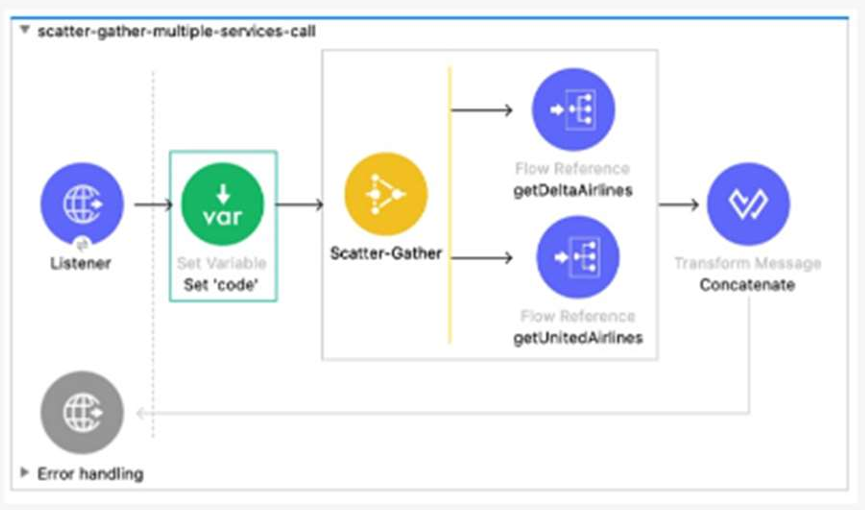
What required changes can be made to give a partial successful response in case the
United Airlines API returns with a timeout?
A. Add a Scatter-gather component inside a Try scope.
Set the payload to a default value ‘Error’ inside the error handler using the On Error
Propagate scope.
B. Add Flow Reference components inside a Try scope.
Set the payload to a default value’’ insider the error handler using the ON Error Continue
scope
C. Add Flow Reference components inside a Try scope
Set the payload to a default value ‘’ inside the error handler using the On Error Propagate
scope
D. Add a Scatter-Gather component inside a Try scope.
Set the payload to a defaultvalue ‘Error’’ inside the error handler using the On Error
Continue scope.
Explanation:
Let’s dive into this MuleSoft flow and figure out how to handle a timeout from the United Airlines API while still providing a partial successful response. The diagram shows a Listener triggering a flow that uses a Scatter-Gather component to call two services (getDeltaAirlines and getUnitedAirlines via Flow References) and then concatenates the results with a Transform Message. The goal is to handle a timeout from the United Airlines API gracefully, ensuring the flow continues with the Delta Airlines data and returns a meaningful response.
A timeout in the United Airlines API call means one of the Scatter-Gather routes will fail. By default, a Scatter-Gather component will fail the entire flow if any route fails unless we manage the error. To achieve a partial success—where the flow uses the successful Delta Airlines data and provides a default value for the failed United Airlines call—we need an error-handling strategy that keeps the process alive and sets a fallback value.
The key here is the Try scope, which allows us to wrap the Scatter-Gather and handle errors without stopping the flow. Inside the Try scope, if an error occurs (like a timeout), we can use an error handler to manage it. The question offers two error-handling options: On Error Propagate and On Error Continue. On Error Propagate will pass the error up the flow, potentially failing it, while On Error Continue will catch the error, allow the flow to proceed, and let us set a default payload. Since we want a partial success, On Error Continue is the better fit—it lets us recover from the timeout and proceed with the available data.
Now, let’s look at the options:
❌ A. Add a Scatter-Gather component inside a Try scope. Set the payload to a default value ‘Error’ inside the error handler using the On Error Propagate scope.
This wraps the Scatter-Gather in a Try scope, which is good, but using On Error Propagate means the error will propagate, likely failing the flow. This doesn’t align with achieving a partial success, so this is incorrect.
❌ B. Add Flow Reference components inside a Try scope. Set the payload to a default value ‘’ inside the error handler using the On Error Continue scope.
Placing individual Flow References (getDeltaAirlines and getUnitedAirlines) inside a Try scope would mean each call is independently wrapped, which could work but complicates the flow. The Scatter-Gather already handles parallel calls, so this is overkill. Plus, setting the payload to an empty string (‘’) isn’t meaningful for a default value. This option is impractical.
❌ C. Add Flow Reference components inside a Try scope. Set the payload to a default value ‘’ inside the error handler using the On Error Propagate scope.
Similar to B, this wraps individual Flow References in a Try scope, which isn’t necessary with Scatter-Gather. The empty string default and On Error Propagate combination also fails to support partial success, making this incorrect.
✅ D. Add a Scatter-Gather component inside a Try scope. Set the payload to a default value ‘Error’ inside the error handler using the On Error Continue scope.
This is the winner. Wrapping the Scatter-Gather in a Try scope lets us catch the timeout error from the United Airlines call. Using On Error Continue in the error handler allows the flow to proceed, and setting the payload to ‘Error’ (or a similar default) for the failed call ensures we have a placeholder value. The Scatter-Gather will still process the successful Delta Airlines data, and the Transform Message can concatenate the results, giving us a partial successful response.
To implement this, you’d place the Scatter-Gather inside a Try scope, configure an On Error Continue handler, and use a Set Payload component in the error handler to assign ‘Error’ (or a more descriptive default) when the timeout occurs. The flow then continues, merging the Delta Airlines data with the default value.
✅ Answer: D
The correct approach uses a Try scope around the Scatter-Gather to catch the timeout error from the United Airlines API. The On Error Continue scope in the error handler allows the flow to recover by setting a default payload (‘Error’), enabling a partial successful response with the Delta Airlines data. This leverages MuleSoft’s error-handling capabilities to maintain flow resilience.
ℹ️ Reference:
MuleSoft Documentation on Error Handling and Scatter-Gather Component.
A scatter-gather router isconfigured with four routes:Route A, B, C and D. Route C false.
A. Error,errorMesage.payload.results [‘2’]
B. Payload failures[‘2’]
C. Error,errorMessage,payload.failures[‘2’]
D. Payload [‘2’]
Explanation:
The scatter-gather router in Mule 4 executes all routes concurrently and collects their responses. If a route fails (e.g., Route C), the router can be configured with a target variable to store results and failures, or it can throw an error that can be caught in an error handler. The aggregated payload typically contains a results array for successful responses and a failures array for failed routes, indexed by the route’s position. Let’s evaluate the options:
Option A: Error, errorMessage.payload.results[‘2’]
This suggests accessing the results array within an errorMessage.payload, which contains successful route outputs. However, if Route C fails, its entry in the results array would be null or undefined, not an error detail. This option is incorrect because it looks for a result where a failure occurred.
Option B: Payload.failures[‘2’]
This attempts to access the failures array directly from the payload. While the payload can contain a failures array when failures occur, this syntax is incomplete. In Mule 4, when an error is thrown (e.g., in a default error handler), the failure details are typically accessed via the error object (e.g., error.errorMessage.payload.failures), not just payload.failures alone. This option lacks the proper context and is incorrect.
Option C: Error, errorMessage, payload.failures[‘2’]
This is the correct approach. When a scatter-gather route fails and an error is raised (e.g., caught in a Try scope or global error handler), the error object contains an errorMessage with a payload. This payload includes a failures array that lists details of failed routes, indexed by their position (0 for A, 1 for B, 2 for C, 3 for D). The expression error.errorMessage.payload.failures[‘2’] accesses the failure details for Route C, which aligns with the scenario where Route C failed. The comma-separated format (e.g., "Error, errorMessage, payload.failures[‘2’]") may be a stylistic choice in the question, but it implies the full path to the failure data.
Behavior: If Route C fails (e.g., due to a connectivity issue or invalid data), the failures[‘2’] entry would contain the error details (e.g., error type, message), while results[‘2’] would be null.
Option D: Payload[‘2’]
This suggests accessing the payload directly at index 2, which might imply the aggregated payload’s structure. However, the scatter-gather payload is an object with results and failures arrays, not a simple list indexed directly. Accessing payload[‘2’] would not reliably target the failure for Route C and is incorrect without the proper failures context.
Detailed Behavior
Scatter-Gather Operation:
The router runs Routes A, B, C, and D in parallel. If Route C fails, the scatter-gather can either:
Continue and aggregate results/failures (if configured with target or no error propagation).
Throw an error (if set to fail on any route failure), which can be caught to inspect failures.
Failure Handling:
When an error is handled, the error.errorMessage.payload contains a structure like:
results:
Array of successful route outputs (e.g., [resultA, resultB, null, resultD]).
failures: Array of error details for failed routes (e.g., [null, null, {error: "Route C failed"}, null]).
Indexing:
The index [‘2’] corresponds to Route C, the third route, making failures[‘2’] the relevant data point for its failure.
Key Considerations for the MuleSoft Developer II Exam
Scatter-Gather Router:
Understand its parallel execution and aggregation of results/failures.
Error Handling: Know how to access error details using the error object, especially error.errorMessage.payload.failures.
Payload Structure:
Recognize the results and failures arrays in the scatter-gather output.
Configuration:
Be aware that scatter-gather behavior (e.g., failing on error) depends on settings like failOn="ANY".
Refer to the exhibit.
What is the result if ‘’Insecure’’ selected as part of the HTTP Listener configuration?
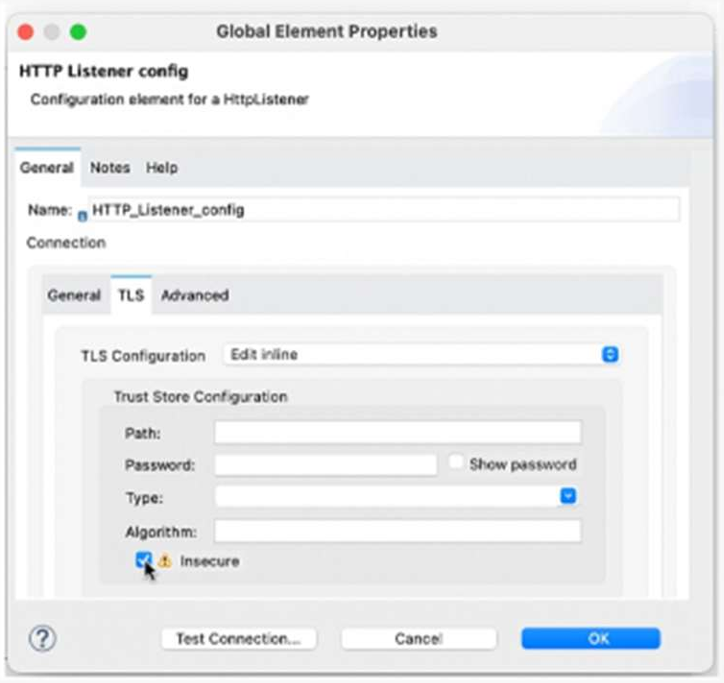
A. The HTTP Listener will trust any certificate presented by the HTTP client
B. The HTTP Lister will accept any unauthenticated request
C. The HTTP listener will only accept HTTP requests
D. Mutual TLS authentication will be enabled between this HTTP Listener and an HTTP client
Explanation:
When configuring an HTTPS Listener in MuleSoft, enabling the “Insecure” checkbox means:
The listener does not validate the client’s certificate.
It accepts any certificate, even if it’s self-signed, expired, or from an untrusted CA.
This is typically used in development or testing environments, where strict TLS validation is not required.
Why the Other Options Are Incorrect:
B. Accepts any unauthenticated request
Not accurate — it still uses HTTPS, just skips certificate validation.
C. Only accepts HTTP requests
Incorrect — “Insecure” applies to HTTPS, not HTTP.
D. Mutual TLS authentication enabled
Opposite — “Insecure” disables certificate validation, which is required for mutual TLS.
Reference:
You can read more about this in the MuleSoft HTTP Listener Configuration Guide.
Would you like to explore how to securely configure mutual TLS in MuleSoft for production environments?
An order processing system is composed of multiple Mule application responsible for warehouse, sales and shipping. Each application communication using Anypoint MQ. Each message must be correlated against the original order ID for observabilityand tracing. How should a developer propagate the order ID as the correlation ID across each message?
A. Use the underlying HTTP request of Anypoint MQ to set the ‘X-CORRELATION_ID’ header to the order ID
B. Set a custom Anypoint MQ user property to propagate the order ID and set the correlation ID in the receiving applications
C. Use the default correlation ID, Anypoint MQ will sutomatically propagate it
D. Wrap all Anypoint MQ Publish operations within a With CorrelationID scope from the Tracing module, setting the correlation ID to the order ID
Explanation:
In a distributed order processing system where multiple Mule applications (e.g., warehouse, sales, and shipping) communicate via Anypoint MQ, ensuring observability and tracing is critical. Each message must be correlated to the original order ID to track its journey across the system. MuleSoft provides the Tracing module to propagate correlation IDs explicitly, which is the recommended approach for maintaining traceability in asynchronous messaging scenarios like Anypoint MQ. Let’s analyze why D is the best choice:
Tracing Module and Correlation ID:
🧩 The Tracing module in MuleSoft provides the With CorrelationID scope, which allows developers to explicitly set a correlation ID for messages. This ensures that all operations within the scope (e.g., Anypoint MQ Publish operations) propagate the specified correlation ID, enabling end-to-end traceability.
🧩 By setting the correlation ID to the order ID, all messages published to Anypoint MQ queues (e.g., for warehouse, sales, or shipping) will carry the same correlation ID, making it easy to trace the order’s lifecycle across applications.
🧩 This approach integrates seamlessly with MuleSoft’s observability tools (e.g., Anypoint Monitoring) and external systems that support correlation IDs for tracing.
Anypoint MQ and Correlation ID:
Anypoint MQ supports a correlationId property for messages, which is used to track related messages across queues. The Tracing module’s With CorrelationID scope automatically sets this property for Anypoint MQ Publish operations, ensuring consistency without requiring manual configuration of message properties.
MuleSoft Best Practices:
The Tracing module is the recommended way to manage correlation IDs in Mule 4 for distributed systems, as it provides a standardized, reusable, and observable way to propagate context across flows and applications.
Using the With CorrelationID scope simplifies the developer’s task and ensures compatibility with MuleSoft’s observability ecosystem.
Why not the other options?
A. Use the underlying HTTP request of Anypoint MQ to set the ‘X-CORRELATION_ID’ header to the order ID:
Anypoint MQ is a managed messaging service, and its underlying transport is abstracted from developers. Mule applications interact with Anypoint MQ via the Anypoint MQ Connector, not raw HTTP requests. There is no direct access to set HTTP headers like X-CORRELATION_ID in the Anypoint MQ Connector. This option is incorrect and not applicable to Anypoint MQ.
B. Set a custom Anypoint MQ user property to propagate the order ID and set the correlation ID in the receiving applications:
While Anypoint MQ supports custom user properties (via the properties field in the Publish operation), manually setting a custom property for the order ID and then mapping it to the correlation ID in receiving applications is error-prone and less standardized. This approach requires each application to consistently extract and propagate the custom property, increasing complexity. The Tracing module’s With CorrelationID scope is the preferred, standardized way to manage correlation IDs.
C. Use the default correlation ID, Anypoint MQ will automatically propagate it:
Anypoint MQ does not automatically propagate a meaningful correlation ID (e.g., the order ID) unless explicitly set. By default, Mule generates a unique correlation ID for each message, but it is a random UUID, not tied to the order ID. This does not meet the requirement to correlate messages with the original order ID for observability and tracing. Explicitly setting the correlation ID is necessary.
ℹ️ Reference:
➡️ MuleSoft Documentation: Tracing Module – Explains how to use the Tracing module to propagate correlation IDs for observability.
➡️ Anypoint MQ Connector: Anypoint MQ Connector Documentation – Details the Publish and Consume operations, including the correlationId attribute.
➡️ MuleSoft Observability: Anypoint Monitoring – Discusses how correlation IDs enable end-to-end tracing in distributed systems.
➡️ MuleSoft Best Practices: Asynchronous Messaging Patterns – Recommends standardized approaches like the Tracing module for message correlation.
| Page 1 out of 6 Pages |
| 12 |
Our new timed 2026 Salesforce-MuleSoft-Developer-II practice test mirrors the exact format, number of questions, and time limit of the official exam.
The #1 challenge isn't just knowing the material; it's managing the clock. Our new simulation builds your speed and stamina.
You've studied the concepts. You've learned the material. But are you truly prepared for the pressure of the real Salesforce Certified MuleSoft Developer II - Mule-Dev-301 exam?
We've launched a brand-new, timed Salesforce-MuleSoft-Developer-II practice exam that perfectly mirrors the official exam:
✅ Same Number of Questions
✅ Same Time Limit
✅ Same Exam Feel
✅ Unique Exam Every Time
This isn't just another Salesforce-MuleSoft-Developer-II practice questions bank. It's your ultimate preparation engine.
Enroll now and gain the unbeatable advantage of:

Copyright © - All Rights Reserved