
Total 234 Questions
Last Updated On : 27-Apr-2026
Preparing with Salesforce-MuleSoft-Developer practice test 2026 is essential to ensure success on the exam. It allows you to familiarize yourself with the Salesforce-MuleSoft-Developer exam questions format and identify your strengths and weaknesses. By practicing thoroughly, you can maximize your chances of passing the Salesforce certification 2026 exam on your first attempt. Start with free Salesforce Certified MuleSoft Developer - Mule-Dev-201 sample questions or use the timed simulator for full exam practice. Surveys from different platforms and user-reported pass rates suggest Salesforce Certified MuleSoft Developer - Mule-Dev-201 practice exam users are ~30-40% more likely to pass.

Refer to the exhibits.
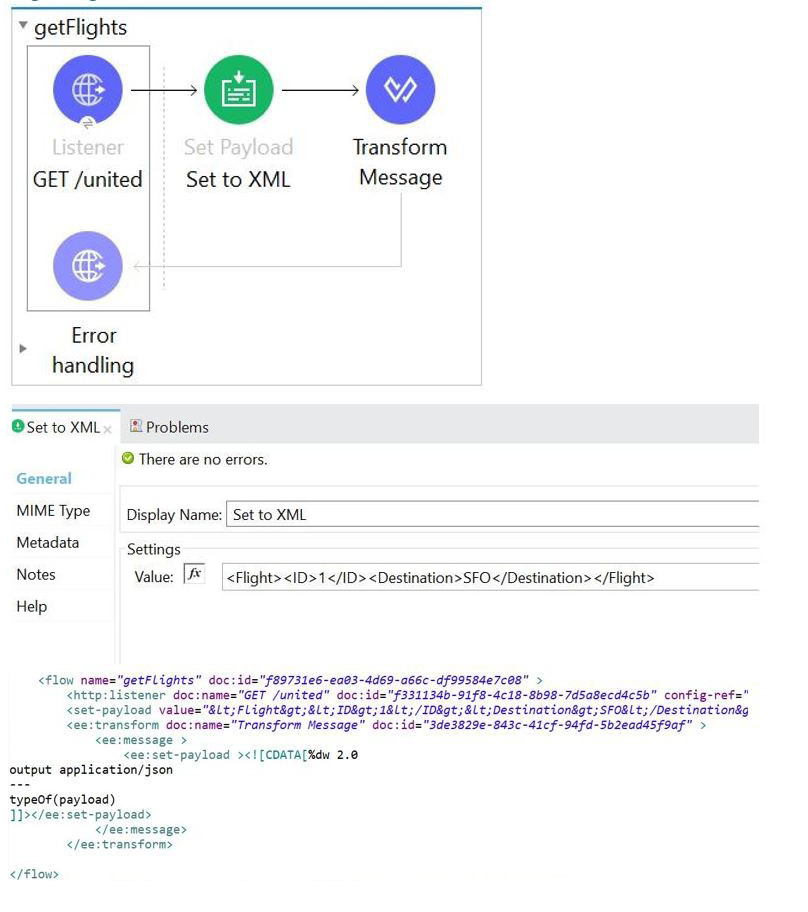
A web client submits a request to below flow. What is the output at the end of the flow?
A. String
B. Object
C. Java
D. XML
Explanation:
The flow consists of three main components: a Listener, a Set Payload component, and a Transform Message component.
Listener (GET /united): This component receives the inbound request, but its effect on the payload is minimal in this context. The payload starts empty (null) or based on the inbound request, but the next component immediately overwrites it.
Set Payload (Set to XML): This component sets the payload to a specific XML string value.
Value:
MIME Type: Not explicitly shown, but typically a literal string or XML structure, resulting in a payload of type String (containing the XML content).
Transform Message: This component is the final operation that determines the output data type. The DataWeave script inside the Transform Message is the key:
$$
output application/json
---
typeOf(payload)
Output Directive: The output application/json directive indicates that the final output format of the Transform Message component will be JSON.
DataWeave Body: The body of the script is typeOf(payload). The typeOf() function in DataWeave returns a String representation of the data type of the payload it is inspecting. Since the payload entering the Transform Message is the XML String from the Set Payload component, typeOf(payload) will return the String value "java.lang.String".
Final Output: Although the output is formatted as JSON, the value being outputted is the String literal "java.lang.String". Since DataWeave's output directive converts the output value to the specified MIME type, a simple string output often results in a JSON string, which is still fundamentally a String representation when viewed in the context of the overall output data type. However, more fundamentally, the result of the DataWeave expression itself is a String (the string name of the type), and this is the direct output. Therefore, the output at the end of the flow is a String.
The most precise answer is String, as it's the result of the typeOf() function.
❌ Incorrect Answers
B. Object: The final output is the result of the typeOf() function, which is a String, not a complex Java object (Object).
C. Java: While the data type names in Mule are based on Java types (e.g., java.lang.String), the final output of the flow is the value returned by the DataWeave script, which is a String, not an arbitrary "Java" type.
D. XML: The payload enters the Transform Message as XML content (contained within a string), but the output is set to application/json, and the value generated by the script (typeOf(payload)) is a String literal, not XML.
📚 References
For detailed information on the components used: DataWeave typeOf() function: Refer to the MuleSoft documentation on DataWeave functions, which confirms that typeOf() returns a string with the name of the type.
Mule Flow Execution: Refer to the documentation on how the payload is passed between components and how the final component (Transform Message) dictates the final output structure and type.
An organization is beginning to follow Mulesoft's recommended API led connectivity approach to use modern API to support the development and lifecycle of the integration solutions and to close the IT delivery gap.
What distinguishes between how modern API's are organized in a MuleSoft recommended API-led connectivity approach as compared to other common enterprise integration solutions?
A. The API interfaces are specified as macroservices with one API representing all the business logic of an existing and proven end to end solution
B. The API interfaces are specified at a granularity intended for developers to consume specific aspect of integration processes
C. The API implementation are built with standards using common lifecycle and centralized configuration management tools
D. The APIO implementations are monitored with common tools, centralized monitoring and security systems
Explanation:
Why MuleSoft API-led Connectivity Organizes APIs Differently
In MuleSoft’s recommended API-led connectivity, APIs are organized into purposeful layers (commonly Experience, Process, and System APIs). The big differentiator versus many traditional enterprise integration approaches is how the APIs are designed and packaged for reuse.
Instead of creating one large, end-to-end integration interface, MuleSoft promotes APIs that expose specific capabilities at the right level of abstraction so they can be reused across multiple channels, teams, and projects. This means APIs are defined at a granularity optimized for consumption: developers can pick and use just the capability they need (for example “get customer profile”, “create order”, “retrieve account status”) without depending on a monolithic integration flow.
That’s exactly what option B describes: interfaces intended for developers to consume specific aspects of integration processes.
Why the Other Options Are Incorrect
A. Macroservice-style “one API for everything”
This describes a monolithic or macroservice approach where one interface represents an entire end-to-end solution. MuleSoft’s API-led approach encourages the opposite: composable, reusable building blocks.
C. Standard lifecycle tools and centralized configuration
These are good practices, but they are not what distinguishes API-led connectivity. Many enterprise integration solutions also use lifecycle tooling and centralized configuration.
D. Centralized monitoring and security
Monitoring and security are important, but again not unique to MuleSoft’s API-led model. Many integration platforms provide centralized monitoring/security; it’s not the key differentiator in how APIs are organized.
Final Conclusion
MuleSoft’s API-led connectivity stands out because it organizes APIs into reusable, consumption-oriented capabilities rather than monolithic end-to-end interfaces, so B is correct.
Refer to the exhibit.
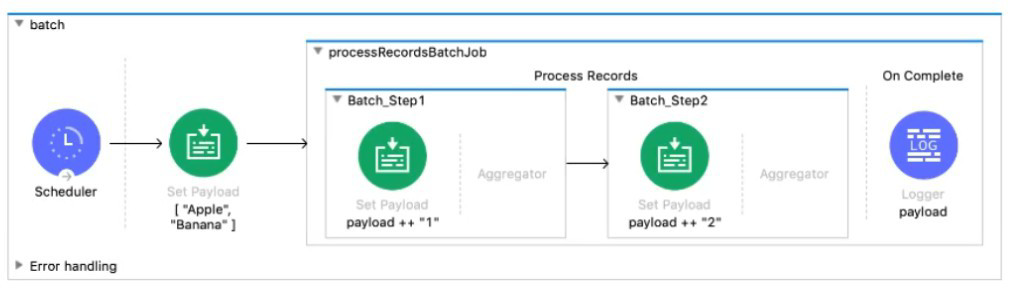
The input array of strings is passed to the batch job, which does NOT do any filtering or aggregating. What payload is logged by the Logger component?
A. Summary report of processed records
B. [ "Apple", "Banana" ]
C. [ "Apptel2", "Bananal2" ]
D. [ "Apptel", "Bananal", 2 ]
Explanation:
From the exhibit, the flow processes the input array ["Apple", "Banana"] through a Batch Job with two steps:
Batch Step 1 appends "1" to each string → ["Apple1", "Banana1"]
Batch Step 2 appends "2" to each string → ["Apple12", "Banana12"]
There’s no filtering or aggregation, so each record flows through both steps unaltered except for the string transformations.
The Logger is placed after the Batch Job, and since the payload is updated in each step, the final logged payload is:
["Apple12", "Banana12"]
Why the other options are incorrect:
A. Summary report of processed records ❌: That would be available in the On Complete phase if explicitly logged, but not here.
B. [ "Apple", "Banana" ] ❌: That’s the original input, not the final transformed output.
D. [ "Apptel", "Bananal", 2 ] ❌: Typo and incorrect structure — not what the batch steps produce.
An SLA based policy has been enabled in API Manager. What is the next step to configure the API proxy to enforce the new SLA policy?
A. Add new property placeholders and redeploy the API proxy
B. Add new environment variables and restart the API proxy
C. Restart the API proxy to clear the API policy cache
D. Add required headers to the RAML specification and redeploy the new API proxy
Explanation:
When you enable an SLA-based policy in API Manager, the policy requires:
Client ID
Client Secret
SLA Tier (Rate-Limiting Tier)
The API proxy must know where to read these values (usually from inbound headers or query parameters).
To do that, Mule requires property placeholders to be added to the proxy configuration (typically in the mule-artifact.properties or in the API Autodiscovery config).
After updating these properties, the API proxy must be redeployed so that the new configuration takes effect.
👉 Therefore, the correct next step is:
Add property placeholders → Redeploy the API proxy
❌ Why the other options are wrong
B. Add new environment variables and restart the API proxy
Environment variables are not required for SLA policy activation.
Policies are applied at runtime through API Gateway, not through environment variables.
C. Restart the API proxy to clear the API policy cache
A restart alone does not load new policy configuration.
If you haven't added the required placeholders, there is nothing new to load.
Also, API Manager deploys policies dynamically — no restart is needed.
D. Add required headers to the RAML specification and redeploy
SLA enforcement does not require modifying RAML.
Client ID/Secret headers are defined at the API Manager policy level, not the API spec level.
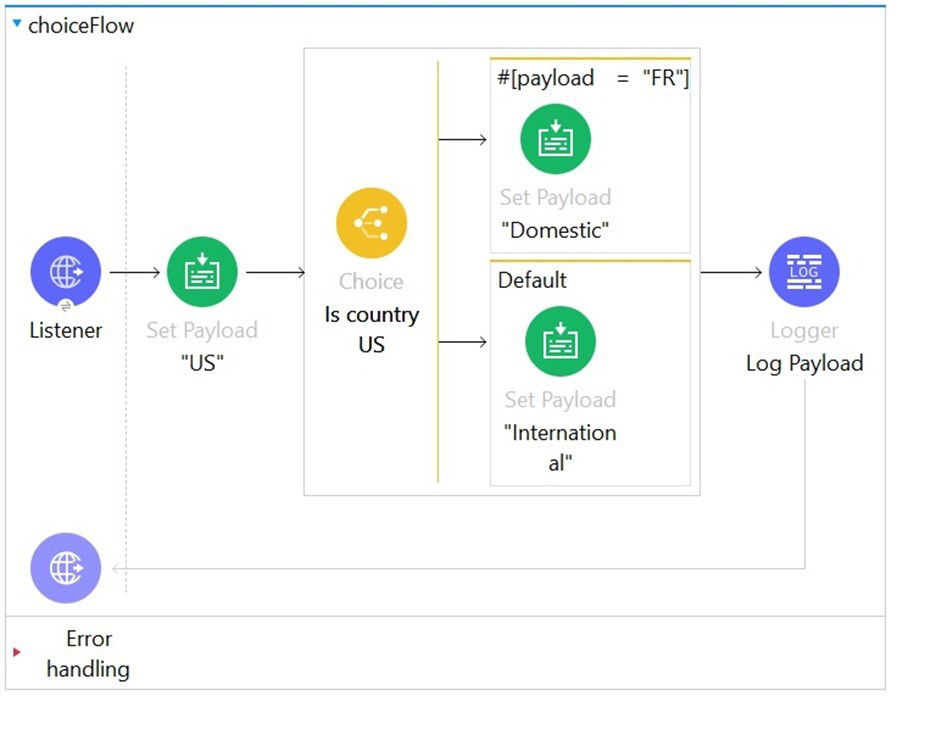
Refer to the exhibits. In the choice router, the When expression for the domestic shipping route is set to "#[payload= "FR"]".
What is the output of logger after the execution of choice router is completed?
A. "Domestic"
B. "International"
C. "US"
D. A dataweave syntax error
Explanation:
The When expression in the Choice router is written as:
#[payload= "FR"]
This is invalid syntax in DataWeave. The single equals sign (=) is used for assignment, not comparison. In conditional expressions like those used in a Choice router, you must use the double equals (==) operator for comparison.
The correct expression should be:
#[payload == "FR"]
Because of the incorrect syntax, MuleSoft will throw a DataWeave syntax error at runtime, and the flow will not proceed past the Choice router.
Why the other options are incorrect:
A. "Domestic": ❌ Would be correct only if the expression were valid and matched "FR"
B. "International": ❌ Would be chosen if the expression were valid but didn’t match
C. "US": ❌ This is the original payload, not the logger output
Refer to the exhibits.
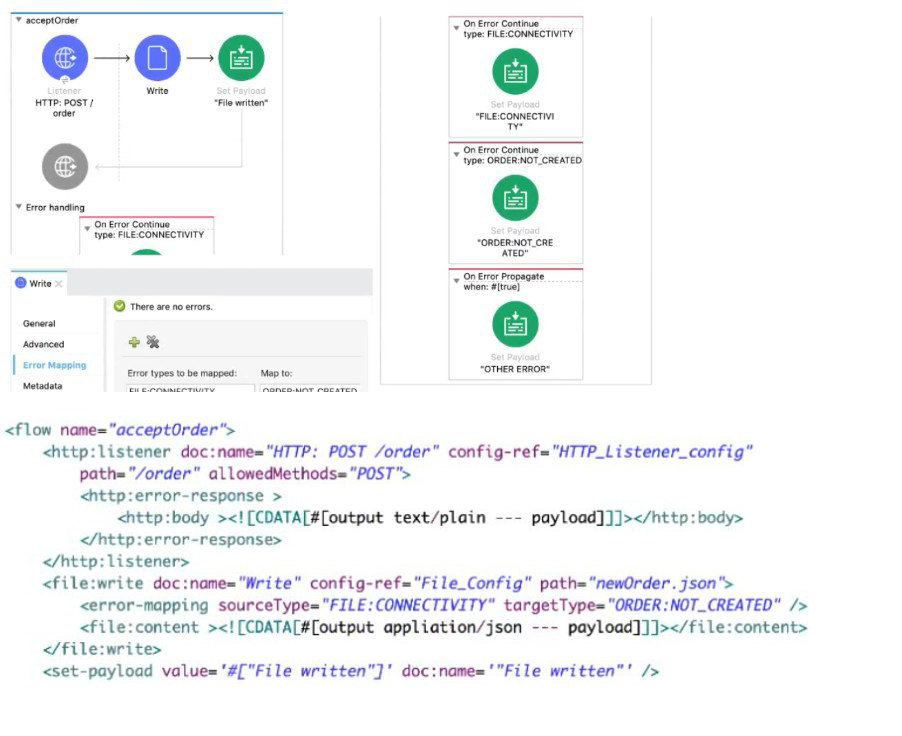
A web client sends a POST request with the payload {"oid": "1000", "itemid": "AC200", "qty": "4" } to the Mule application. The File Write operation throws a FILE:CONNECTIVITY error.
What response message is returned to the web client?
A. ‘’FILE:CONNECnvnY'
B. "ORDER:NOT_CREATED"
C. "OTHER ERROR"
D. "File written"
Explanation:
✅ Correct Option
A. "FILE:CONNECTIVITY" 🟢
When the File Write operation fails with a FILE:CONNECTIVITY error, the flow’s error handling section is triggered. The error handler maps this specific error type to a custom response, which is "FILE:CONNECTIVITY". This is then returned to the client as plain text because the HTTP Listener has been set up to output the payload directly as the response body.
❌ Incorrect Options
B. "ORDER:NOT_CREATED" 🔴
Although there is an error mapping from FILE:CONNECTIVITY to ORDER:NOT_CREATED within the File Write component, the outer On Error Continue in the flow takes precedence. This handler directly sets the payload to "FILE:CONNECTIVITY", overriding the mapped type. So "ORDER:NOT_CREATED" is not returned to the client.
C. "OTHER ERROR" 🔴
This message would only appear if the flow entered the On Error Propagate branch. However, that branch only activates for errors that are not specifically handled by the earlier On Error Continue scopes. Since this case is already caught by FILE:CONNECTIVITY, "OTHER ERROR" never executes.
D. "File written" 🔴
This is the normal success message set in the flow when the file is written successfully. But because the File Write operation throws a FILE:CONNECTIVITY error, the success path never executes. Instead, the error handling path takes over, making this option invalid.
📘 Summary
In this scenario, a POST request with order details is received, but the File Write fails due to a connectivity issue. The application’s error handling logic has a specific On Error Continue for FILE:CONNECTIVITY, which sets the response payload to "FILE:CONNECTIVITY". This ensures the client gets an explicit error message rather than a generic or misleading response.
🔗 Reference
MuleSoft Error Handling (On Error Continue and On Error Propagate)
An app team is developing a mobile banking app. It took them two months to create their own APIs to access transaction information from a central database. The app team later found out that another team had already built an API that accesses the transaction information they need.
According to MuleSoft, what organization structure could have saved the app team two months of development time?
A. Center of Excellence
B. Center for Enablement
C. MuleSoft Support Center
D. Central API Review Board
Explanation
Let’s break down what each term means in the MuleSoft ecosystem.
A. Center of Excellence
A generic term in IT for a group providing best practices, governance, and sometimes development support.
However, in MuleSoft’s methodology, the specific structure focused on API reuse and enablement is called Center for Enablement (C4E).
So while similar, this is not the precise MuleSoft term.
❌ Not the best answer.
B. Center for Enablement (C4E)
✅ This is the correct answer.
MuleSoft emphasizes the C4E model as the organizational structure designed to:
Promote API reuse across teams.
Publish APIs to a central repository (like Anypoint Exchange).
Avoid duplication of work.
Provide governance and standards for API design.
In a C4E model:
Teams check the Exchange before building new APIs.
APIs are discoverable and documented.
This would have prevented the app team from duplicating APIs that already existed.
From MuleSoft Docs:
“A Center for Enablement (C4E) is a cross-functional team that drives the creation and adoption of reusable assets.”
✅ Correct answer.
C. MuleSoft Support Center
Refers to MuleSoft’s product support services for troubleshooting and fixing issues.
Not related to organizational API reuse or preventing duplicate development.
❌ Incorrect.
D. Central API Review Board
Might review APIs for quality, security, naming conventions, etc.
But does not focus on enablement and fostering reuse.
Review boards ensure compliance but aren’t designed as an enablement team for sharing assets.
❌ Incorrect.
Refer to the exhibit.
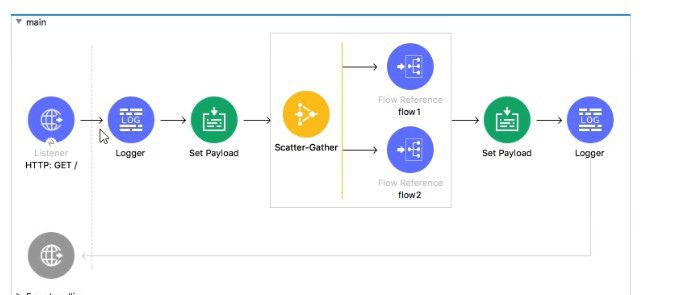
In the execution of the Scatter_Gather, the flow1 route completes after 10 seconds and the flow2 route completes after 20 seconds.
How many seconds does it take for the Scatter_Gather to complete?
A. 0
B. 10
C. 20
D. 30
Explanation:
✅ Correct Option:
C. 20
The Scatter-Gather component executes all of its defined routes concurrently. Its completion time is determined by the longest-running route, as it must wait for all routes to finish before aggregating the results and proceeding. In this scenario, flow2 is the slowest route, taking 20 seconds to complete. Therefore, the total time for the Scatter-Gather to finish is 20 seconds, dictated by this slowest route.
❌ Incorrect Options:
A. 0
This is incorrect because Scatter-Gather is a blocking processor. It does not complete instantly; it actively processes the routes and waits for their results. A value of 0 would imply it finished immediately without executing any logic.
B. 10
This is incorrect because it represents the time of the fastest route (flow1). While flow1 finishes at the 10-second mark, the Scatter-Gather must continue to wait for the slower flow2 to complete its 20-second execution before it can finish.
D. 30
This is incorrect because the routes run in parallel, not sequentially. Their execution times are not added together. The total time is the maximum of the individual route times (20 seconds), not the sum of them (10 + 20 = 30).
📋 Summary:
The Scatter-Gather component processes its routes simultaneously. Its total execution time is governed by the duration of the slowest concurrent process. Since flow1 takes 10 seconds and flow2 takes 20 seconds, the component must wait the full 20 seconds for flow2 to finish before it can complete and move to the next processor in the main flow.
🔗 Reference:
MuleSoft Documentation: Scatter-Gather
An API implementation has been deployed to CloudHub and now needs to be governed. IT will not allocate additional vCore for a new Mule application to act as an API proxy.
What is the next step to preseive the current vCore usage, but still allow the Mule application to be managed by API Manager?
A. Register the same API implementation in Runtime Manager to connect to API Manager
B. Modify the API implementation to use auto-discovery to register with API Manager
C. Upload the Mule application's JAR file to the API instance in API Manager
D. Deploy the same API implementation behind a VPC and configure the VPC to connect to API Manager
Explanation:
This scenario describes governing an existing CloudHub-deployed Mule application without deploying an additional proxy application (which would consume more vCores).
How Auto-Discovery Works:
You add the API Auto-Discovery configuration to your existing Mule application.
This involves adding an APIkit configuration element or HTTP Listener configuration with API Manager-related properties (API ID, environment ID, client ID/secret).
When the application redeploys (or starts), it automatically registers itself with API Manager.
API Manager can then apply policies, collect analytics, and enforce SLAs directly on the existing application—no proxy needed.
Why this preserves vCore usage:
No new Mule application is deployed
The existing application continues running on its already-allocated vCores
Only minimal configuration changes are required
Why the other options are incorrect:
A) Register the same API implementation in Runtime Manager – Runtime Manager is for deployment and monitoring, not API governance. Registering here doesn't connect to API Manager for policy enforcement.
C) Upload the JAR file to the API instance in API Manager – API Manager doesn't deploy JAR files directly. It manages APIs through proxies or auto-discovery.
D) Deploy behind a VPC – This adds infrastructure complexity but doesn't solve the governance problem. A VPC doesn't automatically connect to API Manager, and this approach might actually require more resources.
Key Concept: API Auto-Discovery allows direct governance of existing Mule applications without the overhead of a proxy layer. This is the standard MuleSoft approach for governing existing deployments when you want to avoid additional resource consumption.
Reference: MuleSoft's API Manager documentation on "Managing Existing APIs" specifically describes auto-discovery as the method for registering already-deployed Mule applications with API Manager.
A Mule project contains a DataWeave module like WebStore.dwl that defines a function named loginUser. The module file is located in the project's src/main/resources/libs/etl folder. What is correct DataWeave code to import all of the WebStore.dwl file's functions and then call the loginUser function for the login "Todd.Pal@mulesoft.com"?
A. 1. 1. import libs.etl 2. 2. --- 3. 3. WebStore.loginUser("Todd.Pal@mulesoft.com")
B. 1. 1. import * from libs::etl 2. 2. --- 3. 3. WebStore::loginUser("Todd.Pal@mulesoft.com")
C. 1. 1. import libs.etl.WebStore 2. 2. --- 3. 3. loginUser("Todd.Pal@mulesoft.com")
D. 1. 1. import * from libs::etl::WebStore 2. 2. --- 3. 3. loginUser("Todd.Pal@mulesoft.com")
Explanation:
In DataWeave 2.0, to import functions from a module file, you use the import directive. The path is constructed using double colons :: to represent directory separators, and the file extension (.dwl) is omitted.
Breaking down the correct import:
Module location: src/main/resources/libs/etl/WebStore.dwl
The src/main/resources directory is the root for DataWeave modules.
Therefore, the module path is: libs::etl::WebStore
import * from libs::etl::WebStore imports all functions from that module into the current namespace, allowing you to call loginUser() directly.
Why the other options are incorrect:
A) import libs.etl – This is invalid syntax. DataWeave uses :: separators, not dots. Also, you must specify the filename (WebStore), not just the folder.
B) import * from libs::etl – This tries to import from a directory (etl), not a module file (WebStore). You must import from the specific .dwl file.
C) import libs.etl.WebStore – Uses dot notation (.) instead of the correct double colon (::) syntax.
Key DataWeave Module Import Rules:
- Path separators are ::, not . or /.
- Omit the .dwl extension in the import statement.
- The path is relative to src/main/resources.
- import * from imports all functions so they can be called directly by name.
Reference:
This follows DataWeave 2.0 documentation on module imports, specifically the syntax for importing from custom modules in the resources folder. The pattern import * from some::path::ModuleName is standard.
| Page 1 out of 24 Pages |
| 12345678 |
Our new timed 2026 Salesforce-MuleSoft-Developer practice test mirrors the exact format, number of questions, and time limit of the official exam.
The #1 challenge isn't just knowing the material; it's managing the clock. Our new simulation builds your speed and stamina.
You've studied the concepts. You've learned the material. But are you truly prepared for the pressure of the real Salesforce Certified MuleSoft Developer - Mule-Dev-201 exam?
We've launched a brand-new, timed Salesforce-MuleSoft-Developer practice exam that perfectly mirrors the official exam:
✅ Same Number of Questions
✅ Same Time Limit
✅ Same Exam Feel
✅ Unique Exam Every Time
This isn't just another Salesforce-MuleSoft-Developer practice questions bank. It's your ultimate preparation engine.
Enroll now and gain the unbeatable advantage of:

Copyright © - All Rights Reserved