
Total 184 Questions
Last Updated On : 9-Oct-2026
Preparing with Salesforce-Platform-Developer practice test 2026 is essential to ensure success on the exam. It allows you to familiarize yourself with the Salesforce-Platform-Developer exam questions format and identify your strengths and weaknesses. By practicing thoroughly, you can maximize your chances of passing the Salesforce certification 2026 exam on your first attempt. Start with free Salesforce Certified Platform Developer - Plat-Dev-201 sample questions or use the timed simulator for full exam practice. Surveys from different platforms and user-reported pass rates suggest Salesforce Certified Platform Developer - Plat-Dev-201 practice exam users are ~30-40% more likely to pass.

Universal Containers wants a list button to display a Visualforce page that allows users to edit multiple records. Which Visualforce feature supports this requirement?
A. Standard Controller with Custom List Controller extension
B. Custom List Controller with recordSetVar page attribute
C. Controller Extension and
D. Standard controller and the recordSetVar page attribute
Explanation:
Why D is correct:
To build a Visualforce page capable of handling, displaying, and editing a list of multiple records, such as when launching from a list view action button, developers use a Standard Controller combined with the recordSetVar attribute. The recordSetVar attribute defines a collection or set of records, turning the standard controller into a Standard Set Controller, which natively supports multi-record selection, iteration components such as
Why the other options are incorrect:
A & B:
A "Custom List Controller" is not a native framework feature. Standard list management is handled natively through the built-in standard controller coupled with recordSetVar.
C:
A plain standard controller without recordSetVar only manages a single record context at a time, making it impossible to process multiple records from a list view button without the collection variable.
References
Visualforce Developer Guide: Editing Records with List Controllers
Universal Containers has developed custom Apex code and Lightning Components in a Sandbox environment. They need to deploy the code and associated configurations to the Production environment.
What is the recommended process for deploying the code and configurations to
Production?
A. Use a change set to deploy the Apex code and Lightning Components.
B. Use the Force.com IDE to deploy the Apex code and Lightning Components.
C. Use the Ant Migration Tool to deploy the Apex code and Lightning Components.
D. Use Salesforce CLI to deploy the Apex code and Lightning Components.
Explanation:
Change Sets are the recommended and declarative way to migrate metadata (including Apex classes, triggers, Lightning Components, and configurations) from a Sandbox to Production when both environments are connected via Salesforce Deployment Connections.
A lead developer creates a virtual class called "OrderRequest". Consider the following
code snippet:
public class CustomerOrder{
//code implementation
}
How can a developer use the OrderRequest class within the CustomerOrder class?
A. public class CustomerOrder implements Order
B. public class CustomerOrder extends OrderRequest
C. @Extends(class="OrderRequest") public class CustomerOrder
D. @Implements(class="OrderRequest") public class CustomerOrder
Explanation:
Why B is correct:
In Apex object-oriented programming, when a class wants to inherit from a virtual or abstract class, it uses the extends keyword. Because OrderRequest was defined as a virtual class, CustomerOrder can extend it to inherit its fields, methods, and behavior.
Why the other options are incorrect:
A. implements:
The implements keyword is used when a class implements an interface, not when inheriting from a virtual class.
C & D. @Extends / @Implements annotations:
Apex does not use annotations for inheritance or interface implementation. It uses native language keywords, such as extends and implements.
References
Salesforce Apex Developer Guide: Inheritance (Virtual and Abstract Classes)
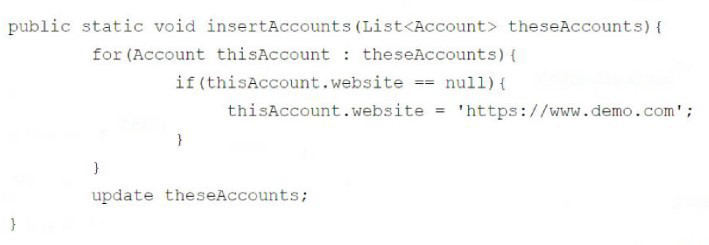
When the code executes, a DML exception is thrown.
How should a developer modify the code to ensure exceptions are handled gracefully?
A. Implement the upsert DML statement.
B. Implement Change Data Capture.
C. Implement a try/catch block for the DML.
D. Remove null items from the list of Accounts.
Explanation:
In the code shown:
public static void insertAccounts(List
for(Account thisAccount : theseAccounts){
if(thisAccount.website == null){
thisAccount.website = 'https://www.demo.com';
}
}
update theseAccounts;
}
The method always calls update theseAccounts.
If even one record in theseAccounts causes an error (for example, a validation rule, required field missing, or duplicate rule), the entire DML operation fails and throws a DmlException.
To handle such errors gracefully, a developer should wrap the DML statement in a try/catch block. This allows you to catch the exception, log it, and maybe handle records individually if needed.
Corrected Example with try/catch:
public static void insertAccounts(List
for(Account thisAccount : theseAccounts){
if(thisAccount.website == null){
thisAccount.website = 'https://www.demo.com';
}
}
try {
update theseAccounts;
} catch (DmlException e) {
// Handle gracefully: log error or take corrective action
System.debug('Update failed: ' + e.getMessage());
}
}
Why not the other options?
A. Upsert → Wouldn’t solve the exception problem. Upsert only helps when you want to insert or update based on an external ID. Errors like validation failures would still throw exceptions.
B. Change Data Capture → This is for event-driven integration, not error handling.
D. Remove null items → That prevents null pointer issues but doesn’t stop DML exceptions (e.g., validation rules or required fields).
Reference:
Salesforce Apex Developer Guide – Exception Handling
Universal Hiring uses Salesforce to capture job applications. A salesforce administrator created two custom objects; Job c acting as the maste object, Job _Application c acting as the detail. Within the Job c object, a custom multi-select picklist, preferred Locations c, contains a list of approved states for the position.
Each Job_Application c record relates to a Contact within the system through a master-detail relationship. Recruiters have requested the ability to view whether the Contact's Mailing State value matches a value selected on the Preferred_Locations c field, within the Job_Application c record. Recruiters would like this value to be kept in sync if changes occur to the Contact's Mailing State.
What is the recommended tool a developer should use to meet the business requirement?
A. Roll-up summary field
B. Apex trigger
C. Formula field
D. Record-triggered flow
Explanation:
The business requirement is to display whether a Contact’s Mailing State matches any value in the Preferred_Locations__c multi-select picklist on the Job__c object, within the related Job_Application__c record, and to keep this value in sync when the Contact’s Mailing State changes. Let’s analyze why a record-triggered flow is the recommended tool and why the other options are less suitable.
Why D. Record-triggered flow?
A record-triggered flow is a declarative automation tool in Salesforce that can be triggered when a record is created or updated. It’s ideal for this scenario because:
1. It can evaluate the Contact’s MailingState (from the Contact object) against the Preferred_Locations__c multi-select picklist on the related Job__c object (via the Job_Application__c master-detail relationship).
2. It can update a field on the Job_Application__c record (e.g., a checkbox or text field) to indicate whether the Contact’s MailingState matches any value in Preferred_Locations__c.
3. It can be configured to run when the Contact’s MailingState is updated, ensuring the Job_Application__c record stays in sync.
4. Flows are declarative, meaning no coding is required, which aligns with Salesforce’s preference for low-code solutions when possible, reducing maintenance overhead.
How it works:
1. Create a record-triggered flow on the Contact object that triggers on create or update when MailingState changes.
2. Use a Get Records element to retrieve related Job_Application__c records and their associated Job__c records.
3. Use a decision element to check if Contact.MailingState is contained in Job__c.Preferred_Locations__c (using the CONTAINS function for multi-select picklists).
4. Update a field on Job_Application__c (e.g., a checkbox Is_Location_Match__c) based on the result.
Why it’s recommended:
It’s a scalable, maintainable, and declarative solution that avoids custom code, aligning with Salesforce best practices for the Platform Developer I exam.
It can handle complex logic (e.g., multi-select picklist comparisons) without requiring Apex.
Why not the other options?
A. Roll-up summary field:
1. Roll-up summary fields are used to aggregate data (e.g., count, sum, min, max) from detail records to a master record in a master-detail relationship. They cannot perform complex logic like comparing a Contact’s MailingState to a multi-select picklist (Preferred_Locations__c) on the master Job__c object.
2. Roll-up summaries are limited to simple calculations and cannot dynamically check for matches or update fields based on external object data (e.g., Contact’s MailingState).
3. This option is incorrect because it doesn’t meet the requirement for dynamic comparison or synchronization.
B. Apex trigger:
An Apex trigger on the Contact object could achieve the requirement by:
1. Triggering on update of MailingState.
2. Querying related Job_Application__c and Job__c records.
3. Comparing MailingState with Preferred_Locations__c using Apex logic (e.g., splitting the multi-4. select picklist values).
4. Updating a field on Job_Application__c.
However, Apex is a coded solution, and Salesforce encourages declarative tools (like flows) over code when the functionality can be achieved declaratively, especially for the Platform Developer I exam, which emphasizes low-code solutions where possible.
While technically feasible, an Apex trigger is overkill and increases maintenance compared to a flow.
C. Formula field:
A formula field on Job_Application__c could theoretically compare Contact.MailingState (accessed via the master-detail relationship) to Job__c.Preferred_Locations__c using the INCLUDES function for multi-select picklists.
Example formula:
INCLUDES(Job__r.Preferred_Locations__c, Contact__r.MailingState)
This would return true if the MailingState matches any value in Preferred_Locations__c.
However, formula fields are recalculated on read (not stored in the database), which can lead to performance issues if used extensively in reports or list views. More importantly, formulas cannot trigger updates or ensure synchronization when MailingState changes—they are passive and only display data.
The requirement to “keep in sync” suggests an active update process, which a formula field cannot provide. Thus, it’s not the best fit.
Key Considerations:
Master-Detail Relationships:
Job__c is the master of Job_Application__c, and Contact is the master of Job_Application__c. This allows the flow to navigate relationships (e.g., Job_Application__c.Job__r.Preferred_Locations__c and Job_Application__c.Contact__r.MailingState).
Multi-Select Picklist:
The Preferred_Locations__c field requires a CONTAINS or INCLUDES check to compare against MailingState. Flows can handle this using formula expressions or decision elements.
Synchronization:
The requirement to keep the value in sync when MailingState changes implies an active update process, which flows can handle by triggering on Contact updates.
Declarative vs. Code:
The Platform Developer I exam prioritizes declarative solutions (e.g., flows) over coded solutions (e.g., Apex) when the requirement can be met without code, as per Salesforce best practices.
Reference:
Salesforce Documentation:
Record-Triggered Flows: Explains how to create flows that trigger on record changes.
Work with Multi-Select Picklists in Flows: Details on handling multi-select picklists in flows.
Salesforce Flow Developer Guide: Covers flow capabilities for automation.
Trailhead:
Automate Your Business Processes with Salesforce Flow: Practical guide to building record-triggered flows.
Salesforce Platform Developer I Certification Study Guide: Emphasizes declarative tools for automation.
Universal Containers is developing a new Lightning web component for their marketing department. They want to ensure that the component is fine tuned and provides a seamless user experience. What are some benefits of using the Lightning Component framework?
A. Automatic support for accessibility standards
B. Easy integration with third-party libraries
C. Compatibility with all web browsers
D. Better performance due to client-side rendering
Explanation:
Why these options are correct:
A. Automatic support for accessibility standards:
The Lightning Web Components (LWC) framework and its base component library, such as lightning-*, are built with accessibility in mind. They provide built-in ARIA attributes, keyboard navigation support, and compliance with WCAG standards out of the box.
B. Easy integration with third-party libraries:
LWC makes it straightforward to include external JavaScript libraries, such as D3, Chart.js, or utility scripts, using standard static resources and the renderedCallback() lifecycle hook.
Why the other options are nuanced or incorrect:
C. Compatibility with all web browsers:
While LWC is compatible with modern, evergreen browsers such as Chrome, Safari, Firefox, and Edge, it does not support legacy browsers such as Internet Explorer 11.
D. Better performance due to client-side rendering:
While LWC leverages a lightweight native web components architecture for high performance, blanket "client-side rendering" is not the primary advertised unique architectural benefit compared to server-side rendering or modern DOM encapsulation.
References
Lightning Web Components Developer Guide: Accessibility
Lightning Web Components Developer Guide: Third-Party JavaScript Libraries
Refer to the code snippet below:
import fetchOps from '@salesforce/apex/OpportunitySearch.fetchOpportunities';
@wire(fetchOps) opportunities;
When a Lightning web component is rendered, a list of opportunities that match certain
criteria should be retrieved from the database and displayed to the end-user.
Which three considerations must the developer implement to make the
fetchOpportunities method available when Lightning web component?
A. The method must be annotated with the @AuraEnabled annotation
B. The method must be annotated with the @InvocableMethod annotation
C. The method cannot mutate the result set retrieved from the database
D. The method must specify the (cacheable=true) attribute.
E. The method must specify the (continuation=true) attribute.
Explanation:
Why these options are correct:
A. @AuraEnabled — Any Apex method that needs to be exposed to Lightning components, either through @wire or imperative calls, must be marked as static and annotated with @AuraEnabled.
C. Cannot mutate result set / read-only data — When data is provisioned through the wire service, the data stream is immutable, and Apex methods used with cacheable=true must be strictly read-only, meaning they cannot perform DML operations.
D. cacheable=true — To use an Apex method with the @wire service adapter, the @AuraEnabled annotation must explicitly include the cacheable=true attribute.
Why the other options are incorrect:
B. @InvocableMethod — This annotation is used to expose Apex methods to Salesforce Flow and other supported automation tools, not for LWC wire adapters.
E. continuation=true — Continuations are used for handling long-running callouts asynchronously in Apex controllers. They are not a mandatory requirement for standard component wiring.
References
Lightning Web Components Developer Guide: Wire an Apex Method
Lightning Web Components Developer Guide: Client-Side Caching of Apex Results
What are two benefits of using External IDs? Choose 2 answers
A. An External ID field can be used Co reference an ID from another external system.
B. An External ID can be a formula field to help create a unique key from two fields in Salesforce.
C. An External ID can be used with Salesforce Mobile to make external data visible.
D. An External ID is indexed and can improve the performance of SOQl quenes.
Explanation:
🟢 Correct Answer: A. An External ID field can be used to reference an ID from another external system.
This is a primary use case for External IDs. When you are integrating Salesforce with an external system, you often need to store the unique identifier from that system on the Salesforce record. By marking a field as an External ID, you can use its value to upsert records (update existing records or insert new ones) without having to know the Salesforce ID (the 15 or 18-character ID). This is crucial for data loading and integration scenarios where the external system's ID is the key to matching records.
🟢 Correct Answer: D. An External ID is indexed and can improve the performance of SOQL queries.
Salesforce automatically creates an index on fields marked as an External ID. An index is a data structure that improves the speed of data retrieval operations on a database table. Therefore, using an External ID in the WHERE clause of a SOQL query will be significantly faster than querying a non-indexed field. This is particularly important for large data sets, as it helps avoid timeouts and improves overall application performance. While other fields can be indexed, the External ID designation is a simple way to ensure a field is indexed for this purpose.
🔴 Incorrect Answer: B. An External ID can be a formula field to help create a unique key from two fields in Salesforce.
Reasoning: This is incorrect because a field designated as an External ID must be a writable field type, such as Text, Number, or Email. Formula fields are read-only and their values are calculated dynamically at runtime. As such, they cannot be used for matching or upserting records via an external key, which is a key function of an External ID. You cannot select the "External ID" checkbox for a formula field when you are creating or editing the field in Salesforce.
🔴 Incorrect Answer: C. An External ID can be used with Salesforce Mobile to make external data visible.
Reasoning: While you can use External IDs in some integration scenarios with Salesforce Mobile, the primary function of an External ID is for record matching and data synchronization, not for making external data visible. The Salesforce feature specifically designed to display data from external systems in real-time, within the Salesforce user interface, is Salesforce Connect. This feature uses External Objects and External Data Sources to present the data, which is a different concept from a field's External ID attribute.
Reference:
For further information on External IDs and their capabilities, you can refer to the official Salesforce documentation on "Custom Field Attributes" and "External IDs." This resource details the supported field types for External IDs and explains their purpose in data integration and performance.
Source: Salesforce Help: Custom Field Attributes
Universal Containers wants to ensure that all new leads created in the system have a valid email address. They have already created a validation rule to enforce this requirement, but want to add an additional layer of validation using automation. What would be the best solution for this requirement?
A. Submit a REST API Callojt with a JSON payload and validate the f elds on a third patty system
B. Use an Approval Process to enforce tne completion of a valid email address using an outbound message action.
C. Use a before-save Apex trigger on the Lead object to validate the email address and display an error message If it Is invalid
D. Use a custom Lightning web component to make a callout to validate the fields on a third party system.
Explanation:
C. Use a before-save Apex trigger on the Lead object to validate the email address and display an error message if it is invalid.
A before-save Apex trigger is the most effective solution for this requirement. It executes before the record is saved to the database, allowing you to validate data and prevent the record from being created or updated if the validation fails. Triggers can display a user-friendly error message directly on the page, which is a powerful way to provide immediate feedback to the user. This approach also works for all methods of record creation, including the user interface, data imports, and APIs, ensuring the validation is applied universally. This method is an excellent way to add an "additional layer of validation" to an existing validation rule.
❌ Why the Other Options Are Incorrect?
A. Submit a REST API Callout with a JSON payload and validate the fields on a third-party system.
While you could perform an API callout from Apex, doing so in a before-save trigger is not allowed. Callouts must be made from asynchronous Apex (future methods or queueable Apex) or after-save triggers, and they don't block the DML operation. You can't use an API callout to prevent a save from happening.
B. Use an Approval Process to enforce the completion of a valid email address using an outbound message action.
An Approval Process is designed to require a record to be approved before it can be finalized. It's not a direct data validation tool that prevents a record from being saved. An Outbound Message is an action that sends data to an external system, but it cannot be used to display an error message on the Salesforce record page or prevent the record from being saved.
D. Use a custom Lightning web component to make a callout to validate the fields on a third-party system.
This solution is not comprehensive enough. A Lightning Web Component (LWC) would only enforce the validation when a user is creating a lead via that specific component. It would not apply if a lead is created through a different method, such as a standard page layout, a data import, or an API call. For universal validation, a trigger is a better choice.
A developer created a new after insert trigger on the Lead object that creates Task records for each Lead. After deploying to production, an existing outside integration that inserts Lead records in batches to Salesforce is occasionally reporting total batch failures being caused by the Task insert statement. This causes the integration process in the outside system to stop, requiring a manual restart. Which change should the developer make to allow the integration to continue when some records in a batch cause failures due to the Task insert statement, so that manual restarts are not needed?
A. Use the Database method with allOrNone set to false.
B. Remove the Apex class from the integration user's profile.
C. Use a try-catch block after the insert statement.
D. Deactivate the trigger before the integration runs
Explanation:
Why A is correct:
By default, standard DML statements, such as insert TaskList;, operate with allOrNone = true. This means that if even a single record in the transaction or batch fails validation or encounters an error, the entire database transaction rolls back, throwing an unhandled exception that causes the batch to fail entirely. Using the Database.insert(list, false) method allows partial success: valid records are successfully inserted, while failed records return result objects that can be logged or ignored without aborting the entire batch.
Why the other options are incorrect:
C. Use a try-catch block after the insert statement:
If a DML statement fails in a bulk context with allOrNone = true, a standard try-catch will catch the exception and roll back the entire batch anyway, preventing the successful records from committing unless paired with partial database methods.
B & D. Removing permissions or deactivating core automation business logic:
Removing permissions or deactivating core automation business logic would break the integration requirements and compliance rules. These approaches do not provide the required partial-success behavior for the DML operation.
References
Salesforce Apex Developer Guide: Using Database Methods for Partial Success
| Page 1 out of 19 Pages |
| 123456 |
Our new timed 2026 Salesforce-Platform-Developer practice test mirrors the exact format, number of questions, and time limit of the official exam.
The #1 challenge isn't just knowing the material; it's managing the clock. Our new simulation builds your speed and stamina.
You've studied the concepts. You've learned the material. But are you truly prepared for the pressure of the real Salesforce Certified Platform Developer - Plat-Dev-201 exam?
We've launched a brand-new, timed Salesforce-Platform-Developer practice exam that perfectly mirrors the official exam:
✅ Same Number of Questions
✅ Same Time Limit
✅ Same Exam Feel
✅ Unique Exam Every Time
This isn't just another Salesforce-Platform-Developer practice questions bank. It's your ultimate preparation engine.
Enroll now and gain the unbeatable advantage of:

Copyright © - All Rights Reserved